VLAN and Trunk Troubleshooting Lab: Find a Missing Allowed VLAN
Build a two-switch VLAN lab, remove VLAN 20 from one trunk end, trace the failure with switching evidence, and restore connectivity without recreating the trunk.
Lab Validation and Evidence Status
Reproducible target, not a field capture: The switch configuration and verification order are reviewed as a reproducible lab. Output is representative until captured from the named IOSvL2 image; VPCS ping output and switch counters must be added after execution.
- Platform: GNS3 2.x target topology with VPCS endpoints
- Devices: Two Cisco IOSvL2 switches and two VPCS hosts
- Software target: Cisco IOSvL2 15.2 target image; interface names and DTP support can differ by licensed image
- Evidence owner: Rudy / Netest.in
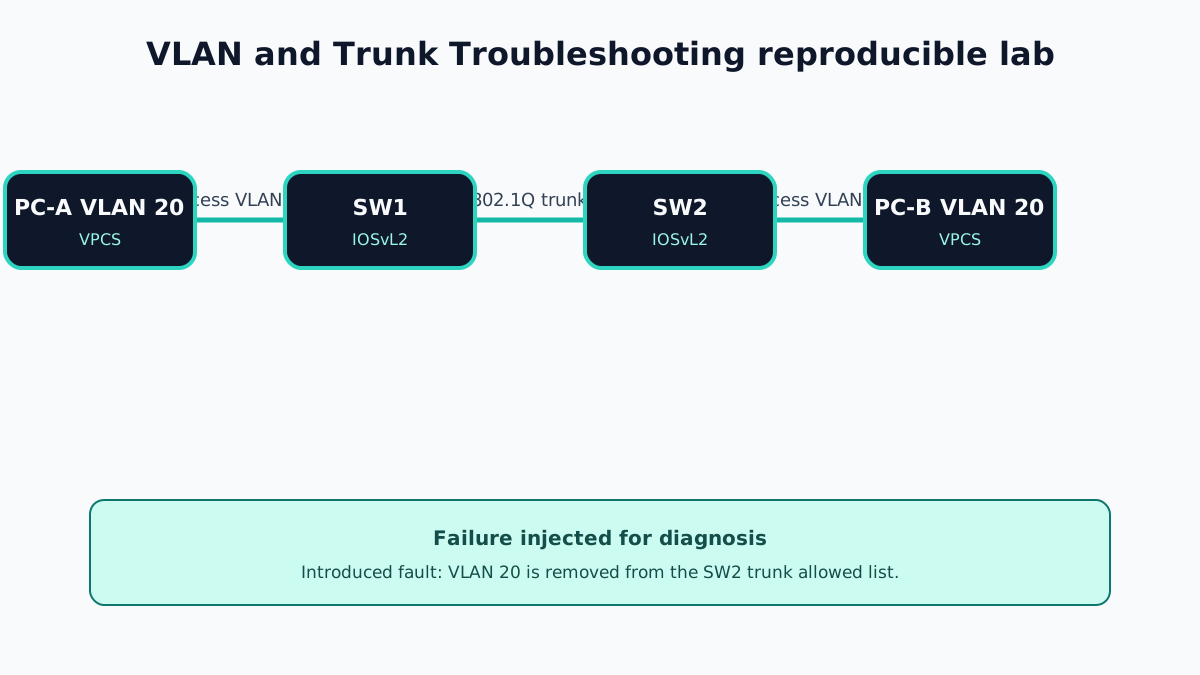
Lab Goal and Evidence Boundary
PC-A and PC-B are both in VLAN 20 but connect to different switches. The inter-switch link is a working static 802.1Q trunk. Removing VLAN 20 from the SW2 allowed list creates a clean, narrow failure: VLAN 10 can still traverse the trunk, while VLAN 20 traffic stops.
The example output is representative. Capture actual operational mode, allowed lists, spanning-tree state, MAC addresses, and VPCS results from your image.
Topology and Addressing
- PC-A:
192.0.2.10/24, connected to SW1Gi0/2 - PC-B:
192.0.2.20/24, connected to SW2Gi0/2 - SW1–SW2 trunk:
Gi0/1on both switches - VLANs created: VLAN 10
USERS, VLAN 20LAB - Native VLAN:
999, created and unused by access ports
Baseline Switch Configuration
SW1
hostname SW1
vlan 10
 name USERS
vlan 20
 name LAB
vlan 999
 name NATIVE-BLACKHOLE
interface GigabitEthernet0/1
 description trunk-to-SW2
 switchport trunk encapsulation dot1q
 switchport mode trunk
 switchport trunk native vlan 999
 switchport trunk allowed vlan 10,20,999
 no shutdown
interface GigabitEthernet0/2
 description PC-A-VLAN20
 switchport mode access
 switchport access vlan 20
 spanning-tree portfast
 no shutdown
SW2
hostname SW2
vlan 10
 name USERS
vlan 20
 name LAB
vlan 999
 name NATIVE-BLACKHOLE
interface GigabitEthernet0/1
 description trunk-to-SW1
 switchport trunk encapsulation dot1q
 switchport mode trunk
 switchport trunk native vlan 999
 switchport trunk allowed vlan 10,20,999
 no shutdown
interface GigabitEthernet0/2
 description PC-B-VLAN20
 switchport mode access
 switchport access vlan 20
 spanning-tree portfast
 no shutdown
If the image accepts only 802.1Q and rejects switchport trunk encapsulation dot1q, omit that line after confirming the platform behavior.
Configure VPCS:
PC-A> ip 192.0.2.10/24
PC-B> ip 192.0.2.20/24
Failure Introduced
Remove VLAN 20 from the allowed list only on SW2:
SW2(config)# interface GigabitEthernet0/1
SW2(config-if)# switchport trunk allowed vlan 10,999
The trunk remains up. This matters because checking only link status or switchport mode trunk will not find the outage.
Representative Failure Output
SW1# show interfaces trunk
Port      Mode  Encapsulation  Status     Native vlan
Gi0/1     on    802.1q         trunking   999
Port      Vlans allowed on trunk
Gi0/1     10,20,999

SW2# show interfaces trunk
Port      Mode  Encapsulation  Status     Native vlan
Gi0/1     on    802.1q         trunking   999
Port      Vlans allowed on trunk
Gi0/1     10,999
PC-A should fail to reach PC-B. SW1 can learn PC-A's MAC in VLAN 20, but it will not learn PC-B across the trunk while VLAN 20 is excluded on SW2.
Diagnostic Workflow
- Verify both host interfaces are
connectedand assigned to VLAN 20 withshow interfaces statusandshow interfaces switchport. - Confirm VLAN 20 exists and is active on both switches with
show vlan brief. - Compare
show interfaces trunkon both ends; do not rely on one side. - Compare native VLAN and allowed VLAN lists.
- Verify spanning-tree forwarding state with
show spanning-tree vlan 20. - Inspect
show mac address-table dynamic vlan 20before and after generating traffic. - Check interface counters, errors, and port-channel membership if the trunk uses EtherChannel.
An empty MAC table can be a consequence of no traffic. Generate a ping, then capture the table again.
Correction and Verification
Add VLAN 20 without replacing the existing allowed list:
SW2(config)# interface GigabitEthernet0/1
SW2(config-if)# switchport trunk allowed vlan add 20
Representative acceptance evidence:
SW2# show interfaces trunk
Port      Vlans allowed on trunk
Gi0/1     10,20,999

PC-A> ping 192.0.2.20
84 bytes from 192.0.2.20 icmp_seq=1 ttl=64 time=1.1 ms
Verify that both switches learn the remote MAC in VLAN 20 and that spanning tree forwards on the trunk. The first ping can lose a packet while ARP resolves.
Runtime Capture Checklist
- GNS3 project and IOSvL2
show version - Both full switch configurations
- VPCS addressing and baseline ping
show vlan briefon both switchesshow interfaces trunkbefore, during, and after the faultshow interfaces switchportfor access and trunk ports- VLAN 20 spanning-tree state
- MAC tables before and after generating traffic
- Post-fix VPCS ping and switch counters
Operational Lessons
- A trunk is not one binary state; VLAN membership and spanning-tree forwarding are per-VLAN controls.
- Always compare both ends of a trunk.
- Use
addwhen changing an established allowed list so an unrelated VLAN is not accidentally removed. - Verify VLAN existence, allowed state, forwarding state, and MAC learning in that order.
Official References
VLAN and Trunk Troubleshooting Frequently Asked Questions
Can a trunk be up while one VLAN is broken?
Yes. The physical link and trunk can remain operational while a VLAN is absent from the allowed and active lists on one end, so other VLANs work and the affected VLAN fails.
Which command should be compared on both ends?
show interfaces trunk provides operational trunking state, native VLAN, allowed VLANs, active VLANs, and forwarding VLANs. Always capture both peers.
Does adding a VLAN to the allowed list create the VLAN?
No. The VLAN must also exist and be active in the switch VLAN database. Verify both show vlan brief and show interfaces trunk.