OSPF Adjacency Troubleshooting Lab: Diagnose an EXSTART MTU Mismatch
Build a three-router OSPF area 0, introduce an interface MTU mismatch, prove why the peers stop in EXSTART, correct the link, and verify routes end to end.
Lab Validation and Evidence Status
Reproducible target, not a field capture: The configuration and diagnosis have been reviewed against Cisco OSPF troubleshooting guidance. CLI blocks marked representative are expected-state examples, not captured output from a Netest.in emulator session. Replace them with timestamped captures after reproducing the lab.
- Platform: GNS3 2.x target topology
- Devices: Three Cisco IOSv virtual routers (R1, R2, and R3)
- Software target: Cisco IOSv 15.9(3)M6 target image; confirm syntax on the licensed image used
- Evidence owner: Rudy / Netest.in
Lab Goal and Evidence Boundary
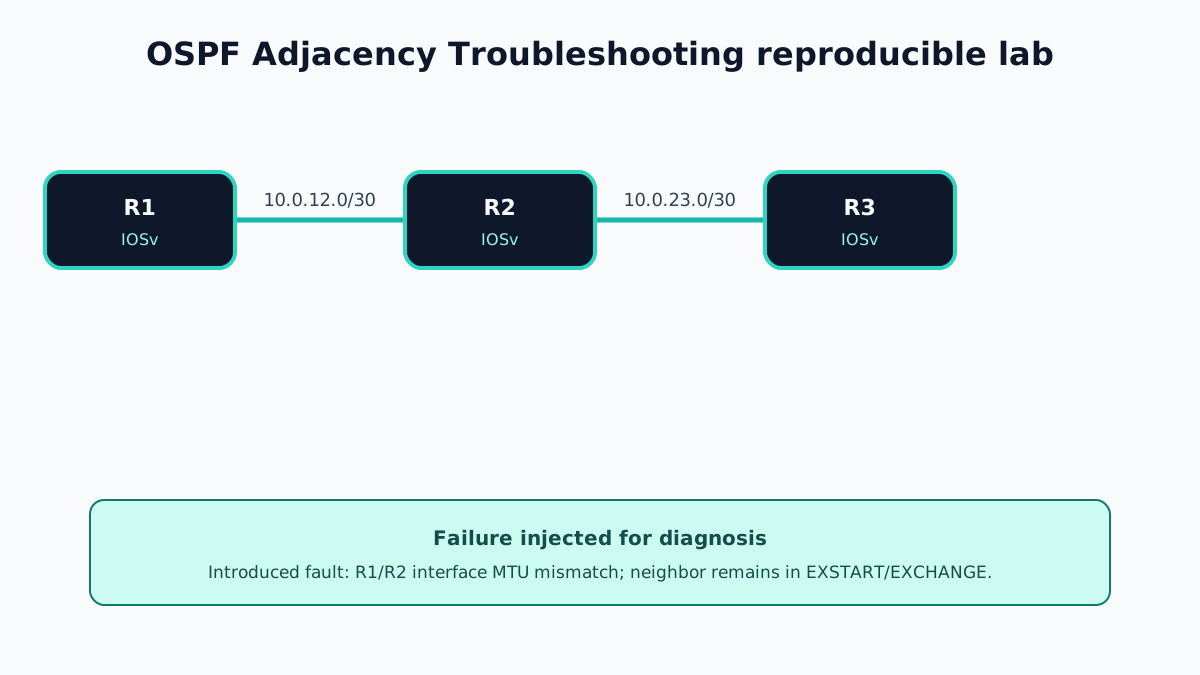
This lab isolates one specific failure: R1 and R2 can ping across 10.0.12.0/30, but their OSPF database exchange does not complete because the interface MTUs differ. R2 and R3 remain healthy, proving that the OSPF process itself is running.
The configurations below are deployable examples for the stated IOSv target. Output blocks are labelled representative expected output because no licensed IOSv runtime is available in this repository. Capture the commands listed near the end after running the topology; do not present expected text as a real device capture.
Topology and Addressing
- R1
Gi0/0:10.0.12.1/30; Loopback0:10.1.1.1/32 - R2
Gi0/0:10.0.12.2/30;Gi0/1:10.0.23.1/30; Loopback0:10.2.2.2/32 - R3
Gi0/0:10.0.23.2/30; Loopback0:10.3.3.3/32 - OSPF process:
1; area:0
Use IOSv interface names shown by your image. Some images expose GigabitEthernet0/0, while others use a different slot/port format.
Baseline Configuration
R1
hostname R1
interface GigabitEthernet0/0
 description R1-to-R2
 ip address 10.0.12.1 255.255.255.252
 no shutdown
!
interface Loopback0
 ip address 10.1.1.1 255.255.255.255
!
router ospf 1
 router-id 10.1.1.1
 network 10.0.12.0 0.0.0.3 area 0
 network 10.1.1.1 0.0.0.0 area 0
R2
hostname R2
interface GigabitEthernet0/0
 description R2-to-R1
 ip address 10.0.12.2 255.255.255.252
 no shutdown
!
interface GigabitEthernet0/1
 description R2-to-R3
 ip address 10.0.23.1 255.255.255.252
 no shutdown
!
interface Loopback0
 ip address 10.2.2.2 255.255.255.255
!
router ospf 1
 router-id 10.2.2.2
 network 10.0.12.0 0.0.0.3 area 0
 network 10.0.23.0 0.0.0.3 area 0
 network 10.2.2.2 0.0.0.0 area 0
R3
hostname R3
interface GigabitEthernet0/0
 description R3-to-R2
 ip address 10.0.23.2 255.255.255.252
 no shutdown
!
interface Loopback0
 ip address 10.3.3.3 255.255.255.255
!
router ospf 1
 router-id 10.3.3.3
 network 10.0.23.0 0.0.0.3 area 0
 network 10.3.3.3 0.0.0.0 area 0
Before introducing the fault, verify that R1 sees R2 in FULL state and R2 sees both R1 and R3.
Failure Introduced
Change only the R2-facing link on R1:
R1# configure terminal
R1(config)# interface GigabitEthernet0/0
R1(config-if)# mtu 1400
R1(config-if)# end
R1# clear ip ospf process
The process clear is intentionally disruptive and is appropriate only in this isolated lab. In production, collect evidence first and use an approved maintenance procedure.
Representative Failure Output
On R1, show ip ospf neighbor should repeatedly show R2 in EXSTART or EXCHANGE, depending on timing and image behavior:
R1# show ip ospf neighbor
Neighbor ID     Pri   State           Dead Time   Address      Interface
10.2.2.2          1   EXSTART/DR      00:00:36    10.0.12.2   GigabitEthernet0/0
Compare the interface evidence instead of assuming a process fault:
R1# show interfaces GigabitEthernet0/0 | include MTU
  MTU 1400 bytes, BW 1000000 Kbit/sec

R2# show interfaces GigabitEthernet0/0 | include MTU
  MTU 1500 bytes, BW 1000000 Kbit/sec
These lines are representative. Exact bandwidth, capitalization, timers, DR roles, and state timing vary by image.
Diagnostic Workflow
- Confirm both physical interfaces are
up/upwithshow ip interface brief. - Prove IP reachability with
ping 10.0.12.2; a successful small ping does not disprove an MTU fault. - Check
show ip ospf neighboron both ends and record the state transition. - Compare
show ip ospf interface GigabitEthernet0/0for area, network type, hello/dead timers, and process attachment. - Compare
show interfaces GigabitEthernet0/0for Layer 3 MTU. - Confirm unique router IDs with
show ip ospf. - Review
show logging | include OSPF|MTU|ADJbefore enabling any debug.
If deeper evidence is required in a lab, use debug ip ospf adj briefly and disable it with undebug all. Avoid unrestricted debugging on a busy production router.
Correction and Verification
Restore a consistent MTU:
R1# configure terminal
R1(config)# interface GigabitEthernet0/0
R1(config-if)# mtu 1500
R1(config-if)# end
The adjacency should progress to FULL. Verify the remote loopback route and data plane:
R1# show ip ospf neighbor
Neighbor ID     Pri   State           Dead Time   Address      Interface
10.2.2.2          1   FULL/DR         00:00:33    10.0.12.2   GigabitEthernet0/0

R1# show ip route ospf | include 10.3.3.3
O        10.3.3.3/32 [110/3] via 10.0.12.2, 00:00:18, GigabitEthernet0/0

R1# ping 10.3.3.3 source Loopback0
Success rate is 100 percent (5/5)
Treat metrics and timestamps as image-dependent. The acceptance criteria are FULL adjacency, the expected OSPF route, and successful sourced reachability.
Runtime Capture Checklist
- GNS3 project file or topology export
show versionfrom every routershow running-config | section router ospf- Interface configurations on both ends of each routed link
- Baseline and failed
show ip ospf neighbor - MTU evidence from both peers
- Relevant logs or a short bounded adjacency debug
- Post-fix neighbor, route, and sourced-ping results
- Screenshot with the GNS3 node names and capture time visible
Operational Lessons
- Troubleshoot from interface state to protocol parameters to database synchronization.
- Do not use
ip ospf mtu-ignoreas the first response. It bypasses the adjacency check without repairing the underlying path. - Record both sides of every parameter comparison; a single-router capture cannot prove a mismatch.
- Use process clears only after evidence collection and only with a rollback plan.
Official References
OSPF Adjacency Troubleshooting Frequently Asked Questions
Why does an OSPF MTU mismatch leave neighbors in EXSTART or EXCHANGE?
OSPF peers exchange database description packets during adjacency formation. If the advertised interface MTU cannot be accepted by the peer, database synchronization does not complete and the state can remain in EXSTART or EXCHANGE.
Should ip ospf mtu-ignore be the permanent fix?
Normally no. Matching the Layer 3 interface MTU on both ends is safer because ignoring the check can hide a transport problem that later affects larger OSPF packets.
Which commands prove the fault?
Compare show ip ospf neighbor, show ip ospf interface, show interfaces, the running interface configuration, and logs on both peers before changing the process.