EIGRP Troubleshooting Lab: Follow a Stuck-in-Active Query Path
Use a four-router query chain to separate neighbor loss from a route that remains active, then follow the outstanding-reply marker toward the real failure domain.
Lab Validation and Evidence Status
Reproducible target, not a field capture: Baseline EIGRP configuration and the diagnostic method are aligned with Cisco guidance. The SIA output is representative and must be replaced with a real capture because reproducing SIA depends on delaying query replies while observing image-specific timers.
- Platform: GNS3 2.x target topology with controlled link impairment
- Devices: Four Cisco IOSv virtual routers (R1 through R4)
- Software target: Cisco IOSv 15.9(3)M6 target image; SIA timing and log text can differ by release
- Evidence owner: Rudy / Netest.in
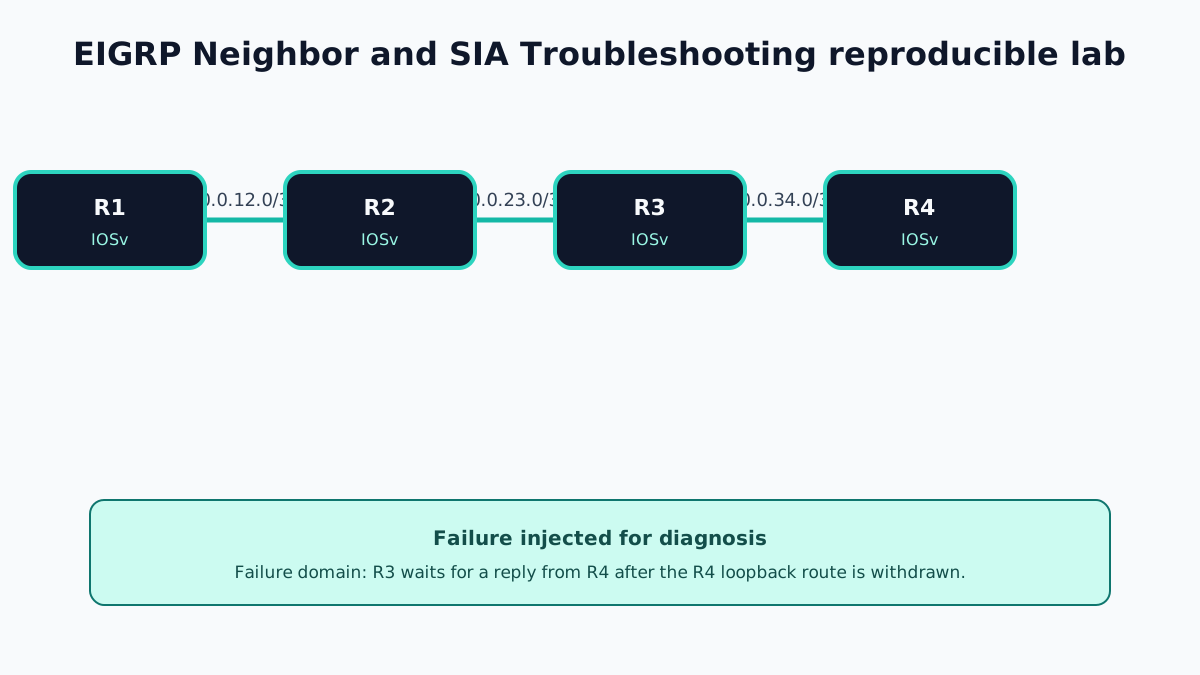
Lab Goal and Evidence Boundary
EIGRP SIA is not safely demonstrated by inventing a log line. The baseline topology below is fully specified, but the failure requires controlled impairment so that an established neighbor continues to be observed while a query reply is delayed. GNS3 link filters, host firewall rules, or CPU impairment behave differently across environments.
Use this as a capture worksheet. The representative output shows the fields to locate, not proof that Netest.in executed the failure.
Topology and Addressing
- Transit links:
10.0.12.0/30,10.0.23.0/30, and10.0.34.0/30 - Router IDs/loopbacks:
10.1.1.1/32through10.4.4.4/32 - Test prefix: R4 Loopback100,
10.100.4.1/32 - EIGRP autonomous system:
100
Baseline Configuration
Apply the same pattern with the appropriate addresses:
! R1
interface GigabitEthernet0/0
 ip address 10.0.12.1 255.255.255.252
 no shutdown
interface Loopback0
 ip address 10.1.1.1 255.255.255.255
router eigrp 100
 eigrp router-id 10.1.1.1
 network 10.0.12.0 0.0.0.3
 network 10.1.1.1 0.0.0.0
 passive-interface Loopback0
! R2
interface GigabitEthernet0/0
ip address 10.0.12.2 255.255.255.252
no shutdown
interface GigabitEthernet0/1
ip address 10.0.23.1 255.255.255.252
no shutdown
router eigrp 100
eigrp router-id 10.2.2.2
network 10.0.12.0 0.0.0.3
network 10.0.23.0 0.0.0.3! R3
interface GigabitEthernet0/0
ip address 10.0.23.2 255.255.255.252
no shutdown
interface GigabitEthernet0/1
ip address 10.0.34.1 255.255.255.252
no shutdown
router eigrp 100
eigrp router-id 10.3.3.3
network 10.0.23.0 0.0.0.3
network 10.0.34.0 0.0.0.3! R4
interface GigabitEthernet0/0
ip address 10.0.34.2 255.255.255.252
no shutdown
interface Loopback100
ip address 10.100.4.1 255.255.255.255
router eigrp 100
eigrp router-id 10.4.4.4
network 10.0.34.0 0.0.0.3
network 10.100.4.1 0.0.0.0
passive-interface Loopback100Verify three adjacencies and confirm R1 learns 10.100.4.1/32 before impairment.
Failure Introduced
The controlled failure has two actions:
- Withdraw R4 Loopback100 so upstream routers must query because no feasible successor exists.
- Use a GNS3 link filter or host-level packet control to delay/drop the relevant EIGRP reliable unicast exchange between R3 and R4 while documenting whether hellos and the adjacency remain present.
R4(config)# interface Loopback100
R4(config-if)# shutdown
Do not claim SIA if the R3–R4 adjacency simply expires first. That is a neighbor/link failure, not the same captured condition. Record which event happened.
Representative Active-Route Output
The key diagnostic is the outstanding reply trail:
R3# show ip eigrp topology active
IP-EIGRP Topology Table for AS(100)/ID(10.3.3.3)

A 10.100.4.1/32, 0 successors, FD is Inaccessible
  1 replies, active 00:01:11, query-origin: Successor Origin
    Remaining replies:
      via 10.0.34.2, r, GigabitEthernet0/1
The lowercase r is the field to follow. On R4, if the same prefix is not active, the fault domain lies between R3 and R4 or in R4's packet processing. Exact columns and query-origin wording depend on release.
Representative SIA/neighbor-reset logs can include:
%DUAL-3-SIA: Route 10.100.4.1/32 stuck-in-active state in IP-EIGRP(0) 100
%DUAL-5-NBRCHANGE: IP-EIGRP(0) 100: Neighbor 10.0.34.2 is down: stuck in active
Capture actual timestamps and interfaces from your image rather than copying this example.
Diagnostic Workflow
- Record
show ip eigrp neighborson every router, including hold time, uptime, sequence number, SRTT, RTO, and queue count. - Run
show ip eigrp topology activeon the router reporting the problem. - Follow each remaining-reply neighbor hop by hop.
- At the first downstream router that is not active for the prefix, inspect the link and device between it and the upstream waiting router.
- Check interface errors, drops, utilization, latency, and control-plane CPU.
- Inspect EIGRP events and bounded packet debugging only in the lab.
- Determine whether query scope is excessive because summarization, stubs, or feasible successors are absent.
Use debug eigrp packets query reply siaquery siareply only if accepted by the target image and only for a short capture. Disable it immediately with undebug all.
Correction and Verification
Remove the link impairment, restore Loopback100, and verify every active entry returns to passive:
R4(config)# interface Loopback100
R4(config-if)# no shutdown
R1# show ip eigrp topology active
IP-EIGRP Topology Table for AS(100)/ID(10.1.1.1)
R1# show ip route 10.100.4.1
D 10.100.4.1/32 [90/...] via 10.0.12.2, GigabitEthernet0/0An empty active view, stable neighbors, restored route, and successful sourced ping are the acceptance criteria. Do not use an arbitrary metric value as a pass/fail requirement.
Runtime Capture Checklist
- GNS3 project and impairment method
show versionand full EIGRP interface addressing- Baseline neighbors and route to
10.100.4.1/32 - Exact withdrawal time
- Active topology output from every hop at the same relative time
- EIGRP logs and bounded packet debug
- Interface error/drop and CPU evidence at R3 and R4
- Recovery logs, passive topology state, restored route, and sourced ping
Operational Lessons
- SIA is the consequence; the actionable fault is the unanswered query and its location.
- Follow the remaining-reply marker downstream instead of resetting every neighbor.
- Constrain query scope with intentional summarization and EIGRP stub design where appropriate.
- A neighbor reset can remove the symptom while destroying the evidence needed to locate the fault.
Official References
EIGRP Neighbor and SIA Troubleshooting Frequently Asked Questions
Does every active EIGRP route indicate a fault?
No. Active is a normal temporary state while DUAL searches for an alternate path. The concern is a route that remains active unusually long or is paired with SIA query, SIA reply, neighbor reset, or DUAL-3-SIA evidence.
Which output identifies the neighbor that owes a reply?
show ip eigrp topology active displays remaining replies. On applicable IOS output, a lowercase r beside a neighbor indicates that the local router is still waiting for that neighbor's reply.
What usually causes EIGRP SIA?
Common causes include an unreliable or congested link, overloaded router, excessive query scope, broken unicast packet delivery, or a downstream device that cannot process and return the query in time.