BGP Troubleshooting Lab: Fix a Neighbor and an Outbound Route Policy
Separate session establishment from route-policy troubleshooting by fixing a remote-AS error first, then tracing an omitted prefix from the local RIB to the advertised-routes view.
Lab Validation and Evidence Status
Reproducible target, not a field capture: Configurations and command order were reviewed against Cisco BGP configuration and troubleshooting references. Outputs are representative expected states until the lab is executed and captured on the stated IOSv image.
- Platform: GNS3 2.x target topology
- Devices: Three Cisco IOSv routers in AS 65001, 65002, and 65003
- Software target: Cisco IOSv 15.9(3)M6 target image; route-policy syntax must be confirmed on the licensed image used
- Evidence owner: Rudy / Netest.in
Lab Goal and Evidence Boundary
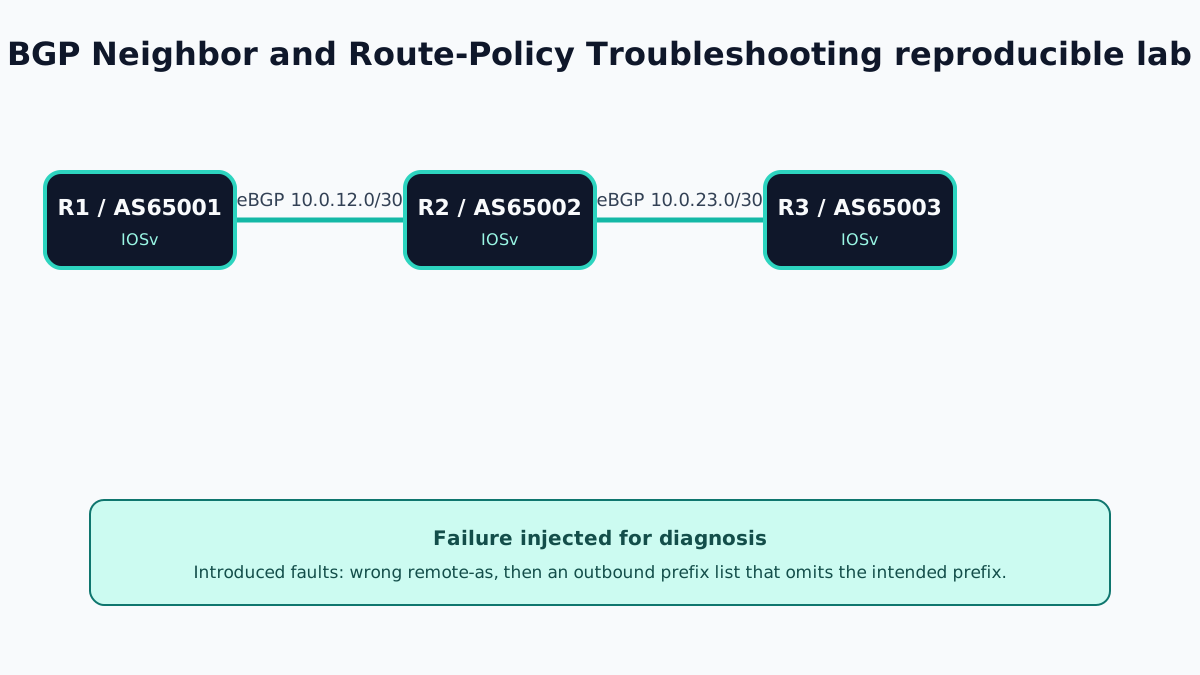
This lab deliberately separates two fault domains. First, R1 is configured with the wrong remote AS for R2, so the session cannot establish. After that is repaired, an outbound prefix list on R2 permits the wrong network and prevents 10.20.20.0/24 from reaching R3.
The CLI output is representative, not a captured Netest.in session. Exact notification codes, counters, timers, table versions, and best-path formatting vary by IOS release.
Topology and Addressing
- R1–R2:
10.0.12.0/30; R1 AS65001; R2 AS65002 - R2–R3:
10.0.23.0/30; R3 AS65003 - R1 originates
10.10.10.0/24 - R2 originates
10.20.20.0/24 - R3 originates
10.30.30.0/24
Baseline Configuration
R1
hostname R1
interface GigabitEthernet0/0
 ip address 10.0.12.1 255.255.255.252
 no shutdown
interface Loopback10
 ip address 10.10.10.1 255.255.255.0
router bgp 65001
 bgp log-neighbor-changes
 neighbor 10.0.12.2 remote-as 65002
 network 10.10.10.0 mask 255.255.255.0
R2
hostname R2
interface GigabitEthernet0/0
 ip address 10.0.12.2 255.255.255.252
 no shutdown
interface GigabitEthernet0/1
 ip address 10.0.23.1 255.255.255.252
 no shutdown
interface Loopback20
 ip address 10.20.20.1 255.255.255.0
router bgp 65002
 bgp log-neighbor-changes
 neighbor 10.0.12.1 remote-as 65001
 neighbor 10.0.23.2 remote-as 65003
 network 10.20.20.0 mask 255.255.255.0
R3
hostname R3
interface GigabitEthernet0/0
 ip address 10.0.23.2 255.255.255.252
 no shutdown
interface Loopback30
 ip address 10.30.30.1 255.255.255.0
router bgp 65003
 bgp log-neighbor-changes
 neighbor 10.0.23.1 remote-as 65002
 network 10.30.30.0 mask 255.255.255.0
Verify both sessions are Established and all three exact prefixes exist before injecting either failure.
Failure One: Wrong Remote AS
On R1, replace the correct peer AS with 65003:
R1(config)# router bgp 65001
R1(config-router)# no neighbor 10.0.12.2 remote-as 65002
R1(config-router)# neighbor 10.0.12.2 remote-as 65003
Representative output:
R1# show ip bgp summary
Neighbor        V    AS MsgRcvd MsgSent   Up/Down  State/PfxRcd
10.0.12.2       4 65003       0       0  00:00:38 Active

R2# show logging | include BGP
%BGP-3-NOTIFICATION: received from neighbor 10.0.12.1 active 2/2 (peer in wrong AS)
Prove IP reachability first. If ping works and TCP/179 is reachable, compare remote-as on both routers. Correct R1 to AS 65002, then verify the session becomes Established.
Failure Two: Outbound Policy Omits the Prefix
Apply an intentionally incorrect prefix list from R2 toward R3:
R2(config)# ip prefix-list TO-R3 seq 10 permit 10.20.200.0/24
R2(config)# route-map EXPORT-R3 permit 10
R2(config-route-map)# match ip address prefix-list TO-R3
R2(config)# router bgp 65002
R2(config-router)# neighbor 10.0.23.2 route-map EXPORT-R3 out
R2# clear ip bgp 10.0.23.2 soft out
The session remains Established, but the intended 10.20.20.0/24 prefix is absent:
R2# show ip bgp 10.20.20.0
*>  10.20.20.0/24  0.0.0.0                  0         32768 i

R2# show ip bgp neighbors 10.0.23.2 advertised-routes
Total number of prefixes 0

R3# show ip bgp 10.20.20.0
% Network not in table
Diagnostic Workflow
- Use
show ip bgp summaryto decide whether this is a session or routing-policy problem. - For a non-Established peer, verify IP reachability, TCP/179, peer addresses,
remote-as, update source, TTL, password, and address-family activation. - For an Established peer, confirm the prefix exists in the local routing table with the exact mask.
- Confirm the prefix exists in the local BGP table.
- Inspect
show ip bgp neighbors 10.0.23.2 advertised-routes. - Inspect the applied neighbor policy in
show running-config | section router bgp. - Test the prefix list directly with
show ip prefix-list TO-R3and check sequence hit counts where supported. - Inspect the route map with
show route-map EXPORT-R3.
Correction and Verification
Correct the intended prefix and refresh outbound policy:
R2(config)# no ip prefix-list TO-R3
R2(config)# ip prefix-list TO-R3 seq 10 permit 10.20.20.0/24
R2# clear ip bgp 10.0.23.2 soft out
Representative acceptance evidence:
R2# show ip bgp neighbors 10.0.23.2 advertised-routes
Network          Next Hop            Metric LocPrf Weight Path
*> 10.20.20.0/24 0.0.0.0                 0         32768 i
Total number of prefixes 1

R3# show ip route bgp 10.20.20.0
B    10.20.20.0/24 [20/0] via 10.0.23.1
Verify a sourced ping from R3 only after confirming return routing. A route in BGP is control-plane evidence, not proof that ACLs, forwarding, or return paths work.
Runtime Capture Checklist
- GNS3 topology export and
show version - Baseline
show ip bgp summaryon all three routers - Wrong-AS logs from both peers
- Corrected Established state
- Local RIB and BGP-table evidence for
10.20.20.0/24 - Applied prefix list and route map, including counters
- Advertised-routes view before and after correction
- R3 BGP and routing-table evidence
- End-to-end ping or traceroute with source specified
Operational Lessons
- Never troubleshoot policy until the neighbor state is Established.
- Trace one prefix through the local RIB, BGP table, export policy, advertised-routes view, receiving BGP table, and receiving RIB.
- Use soft refresh when supported instead of disrupting every BGP session.
- A policy with no matching permit statement produces an implicit deny.
Official References
BGP Neighbor and Route-Policy Troubleshooting Frequently Asked Questions
Why does a BGP neighbor remain in Active state?
Active means BGP is trying to establish the TCP session. Check reachability, TCP port 179, source address, remote-as, update-source, TTL, and any authentication before investigating route policy.
Why can a BGP session be Established but advertise no route?
The prefix might be absent from the local routing table, fail the exact network statement, or be denied by a prefix list, route map, community policy, or address-family activation.
Should I hard-clear BGP after changing a policy?
Prefer a supported soft outbound refresh such as clear ip bgp neighbor-address soft out. A hard reset interrupts the session and should be reserved for cases where a soft action cannot apply the required change.